



0102. 对象的额外属性检查
- 1. 🎯 本节内容
- 2. 🫧 评价
- 3. 🤔 什么是额外属性检查?
- 4. 🤔 额外属性检查(Excess Property Checking)都有哪些叫法?
- 5. 💻 demos.1 - 如何通过 suppressExcessPropertyErrors 配置关闭额外的属性检查
- 6. 🤔 如何触发额外属性检查?
- 7. 🤔 如何绕过额外属性检查?
- 8. 🤔 额外属性检查的实现原理是?【扩展】
- 9. 🤔 常见使用场景
- 10. 🔗 引用
1. 🎯 本节内容
- 额外属性检查的概念
- 触发条件
- 绕过检查的方法
- suppressExcessPropertyErrors 配置
- 实现原理简介
2. 🫧 评价
额外属性检查(Excess Property Checking)是 TypeScript 的一个特殊类型检查机制,用于检测对象字面量中的多余属性。
这个检查的目的是捕获拼写错误和无效配置:
ts
interface Config {
  host: string
  port: number
}

// ❌ 拼写错误:prot 应该是 port
const config: Config = {
  host: 'localhost',
  prot: 3000, // Error: 'prot' does not exist in type 'Config'
}额外属性检查的特点:
- 只针对对象字面量:直接赋值时触发
- 严格但不总是有效:可以被绕过
- 帮助发现错误:特别是拼写错误
- 有时过于严格:需要绕过机制
3. 🤔 什么是额外属性检查?
额外属性检查会拒绝对象字面量中的多余属性。
ts
interface User {
  name: string
  age: number
}

// ❌ 额外属性检查:email 不在类型定义中
const user1: User = {
  name: 'Alice',
  age: 25,
  email: 'alice@example.com', // Error: Object literal may only specify known properties
}

// ✅ 只包含已知属性
const user2: User = {
  name: 'Alice',
  age: 25,
}这个严格的额外属性检查有什么用?
ts
interface Config {
  timeout: number
  retries: number
}

// ❌ 可以捕获意外的拼写错误
const config: Config = {
  timeout: 5000,
  retrys: 3, // Error: 拼写错误,应该是 retries
}
// Object literal may only specify known properties, and 'retrys' does not exist in type 'Config'.(2353)4. 🤔 额外属性检查(Excess Property Checking)都有哪些叫法?
| 术语 | 来源 | 说明 |
|---|---|---|
| Excess Property Checking | 官方文档常用 | 强调检查「多余属性」的行为 |
| Freshness Checking | TypeScript 内部实现 | 强调对象字面量的「新鲜」状态 |
| Strict Object Literal Checking | 社区常用 | 强调对对象字面量的「严格检查」 |
- 对象字面量的「额外属性检查」(Excess Property Checking)
- 对象字面量的「新鲜度检查」(Freshness Checking)
- 对象字面量的「严格对象字面量检查」(Strict Object Literal Checking)
上面这些术语指代的是同一个机制。
TypeScript 对「新鲜」的对象字面量和「已存在」的变量会采用不同的检查策略。
ts
type A = { x: number }

let a: A = { x: 1, y: 'extra' } // ❌ 错误
// Object literal may only specify known properties,
// and 'y' does not exist in type 'A'.(2353)ts
type A = { x: number }

const obj = { x: 1, y: 'extra' }
let a: A = obj // ✅ 允许在 TypeScript 官方手册中,这个特性被称为 Excess Property Checks:
- Object literals get special treatment and undergo excess property checking when assigning them to other variables, or passing them as arguments.
- 对象字面量在赋值给其他变量或作为参数传递时会受到特殊处理,并经历额外的属性检查。
所以在学术或正式场合,推荐使用「额外属性检查」(Excess Property Checking)这个术语,因为它是官方文档的标准表述。
5. 💻 demos.1 - 如何通过 suppressExcessPropertyErrors 配置关闭额外的属性检查
先来看看官方对这个配置的描述:
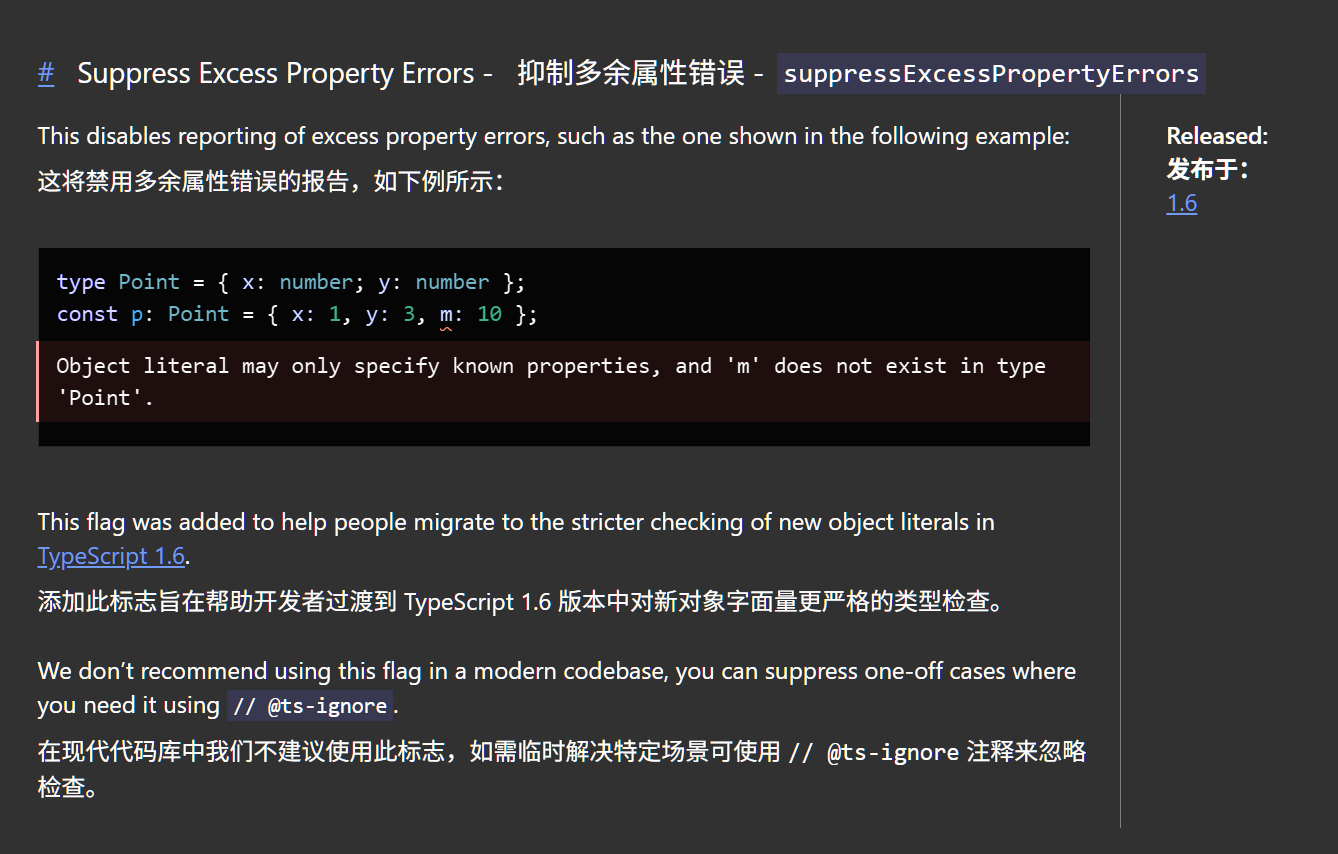
历史背景:
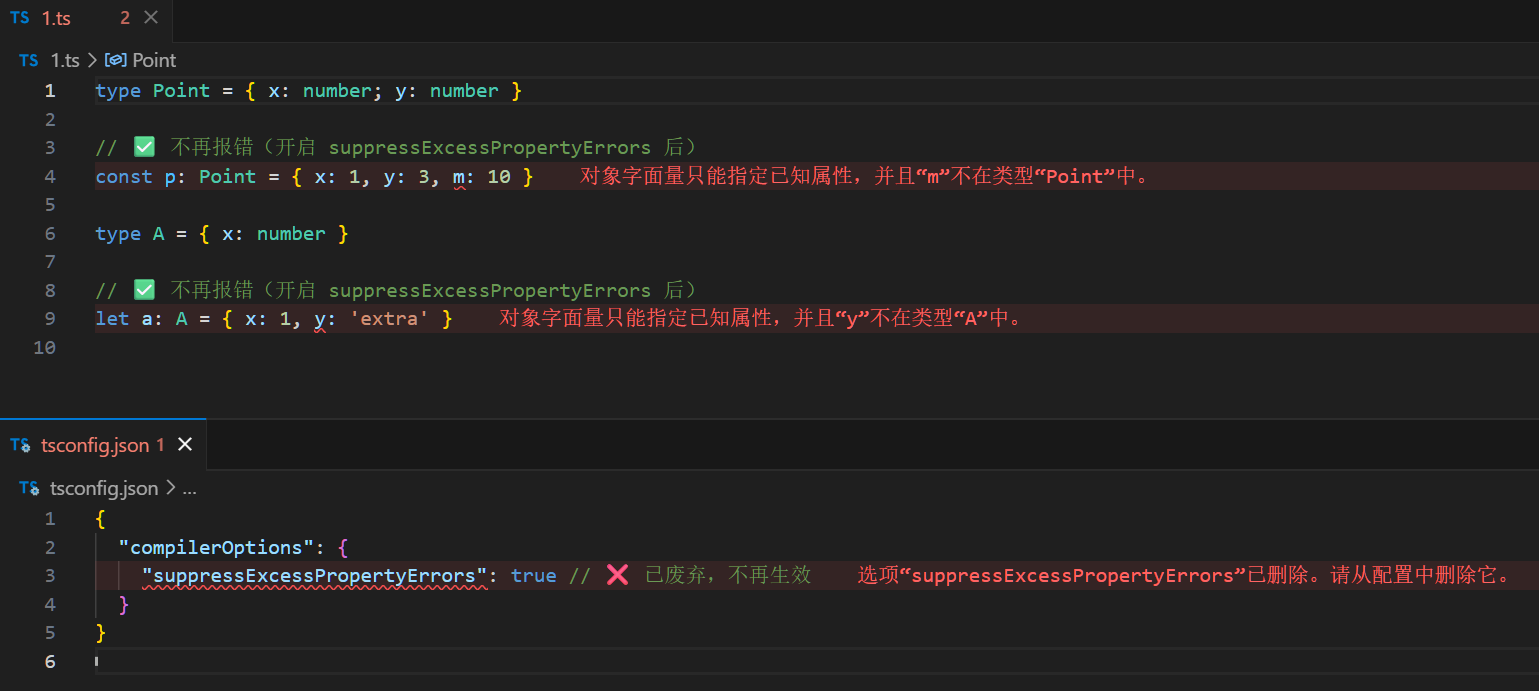
suppressExcessPropertyErrors是 TypeScript 1.6 时期引入的临时配置项,用于帮助开发者从旧版本迁移。- 目前(25.11)测试时发现该配置项已废弃,在现代 TypeScript 中不再生效。
json
// tsconfig.json
{
  "compilerOptions": {
    "suppressExcessPropertyErrors": true // ❌ 已废弃,不再生效
  }
}如果这个配置还没被废弃的话,我们其实可以通过开启该配置来避免“对象的额外属性检查”规则。
ts
type Point = { x: number; y: number }

// ✅ 不再报错(开启 suppressExcessPropertyErrors 后)
const p: Point = { x: 1, y: 3, m: 10 }

type A = { x: number }

// ✅ 不再报错(开启 suppressExcessPropertyErrors 后)
let a: A = { x: 1, y: 'extra' }json
{
  "compilerOptions": {
    "suppressExcessPropertyErrors": true // ❌ 已废弃,不再生效
  }
}实际测试结果(suppressExcessPropertyErrors 无效):
6. 🤔 如何触发额外属性检查?
触发条件:额外属性检查只在对象字面量直接赋值时触发。
- 对象字面量直接赋值触发额外属性检查
- 函数参数触发额外属性检查
- 函数返回值触发额外属性检查
ts
interface Point {
  x: number
  y: number
}

// 触发检查:对象字面量直接赋值
const p1: Point = {
  x: 10,
  y: 20,
  z: 30, // ❌ Error
}
// Object literal may only specify known properties, and 'z' does not exist in type 'Point'.(2353)

// 不触发检查:先赋值给变量
const obj = {
  x: 10,
  y: 20,
  z: 30,
}
const p2: Point = obj // ✅ 允许ts
interface Options {
  width: number
  height: number
}

function render(options: Options) {
  // 实现
}

// 触发检查
render({
  width: 100,
  height: 200,
  color: 'red', // ❌ Error
})
// Object literal may only specify known properties, and 'color' does not exist in type 'Options'.(2353)

// 不触发检查
const opts = {
  width: 100,
  height: 200,
  color: 'red',
}
render(opts) // ✅ 允许ts
interface User {
  name: string
  age: number
}

// 触发检查
function getUser1(): User {
  return {
    name: 'Alice',
    age: 25,
    email: 'alice@example.com', // ❌ Error
  }
}
// Object literal may only specify known properties, and 'email' does not exist in type 'User'.(2353)

// 不触发检查
function getUser2(): User {
  const user = {
    name: 'Alice',
    age: 25,
    email: 'alice@example.com',
  }
  return user // ✅ 允许
}7. 🤔 如何绕过额外属性检查?
虽然 TS 官方不再支持 suppressExcessPropertyErrors 配置了,但我们还是有不少手段可以绕过对象类型的额外属性检查规则的。
下面这些是一些相对比较常见的做法:
- 使用变量
- 类型断言
- 索引签名
- 交叉类型
- 扩展运算符
ts
interface Config {
  host: string
  port: number
}

// ✅ 先赋值给变量
const config = {
  host: 'localhost',
  port: 3000,
  timeout: 5000, // 额外属性
}

const serverConfig: Config = config // ✅ 不报错ts
interface Config {
  host: string
  port: number
}

// ✅ 使用类型断言
const config: Config = {
  host: 'localhost',
  port: 3000,
  timeout: 5000,
} as Config // ✅ 不报错ts
// ✅ 添加索引签名允许额外属性
interface Config {
  host: string
  port: number
  [key: string]: any // 允许任意额外属性
}

const config: Config = {
  host: 'localhost',
  port: 3000,
  timeout: 5000, // ✅ 允许
  ssl: true, // ✅ 允许
}ts
interface BaseConfig {
  host: string
  port: number
}

// ✅ 交叉类型允许额外属性
const config: BaseConfig & { timeout: number } = {
  host: 'localhost',
  port: 3000,
  timeout: 5000, // ✅ 明确声明的额外属性
}ts
interface User {
  name: string
  age: number
}

// ✅ 使用扩展运算符
const user: User = {
  name: 'Alice',
  age: 25,
  ...{ email: 'alice@example.com' }, // ✅ 不报错
}8. 🤔 额外属性检查的实现原理是?【扩展】
8.1. 核心源码位置
ts
// tests/baselines/reference/api/typescript.d.ts

// TypeScript 使用 ObjectFlags 枚举来标记对象类型的各种特性
enum ObjectFlags {
  None = 0,
  Class = 1,
  Interface = 2,
  Reference = 4,
  Tuple = 8,
  Anonymous = 16,
  Mapped = 32,
  Instantiated = 64,
  ObjectLiteral = 128,
  EvolvingArray = 256,
  ObjectLiteralPatternWithComputedProperties = 512,
  ReverseMapped = 1024,
  JsxAttributes = 2048,
  JSLiteral = 4096,

  // FreshLiteral 就是用来标记新鲜对象字面量的标志
  FreshLiteral = 8192,

  ArrayLiteral = 16384,
  SingleSignatureType = 134217728,
  ClassOrInterface = 3,
  ContainsSpread = 2097152,
  ObjectRestType = 4194304,
  InstantiationExpressionType = 8388608,
}ts
// src/compiler/types.ts

// 编译器内部定义了 FreshObjectLiteralType 接口来表示新鲜的对象字面量类型

/** @internal */
// Object literals are initially marked fresh. Freshness disappears following an assignment,
// before a type assertion, or when an object literal's type is widened. The regular
// version of a fresh type is identical except for the TypeFlags.FreshObjectLiteral flag.
export interface FreshObjectLiteralType extends ResolvedType {
  regularType: ResolvedType // Regular version of fresh type
  // 这个接口包含一个 regularType 属性,指向该类型的“非新鲜”版本。
  // 当对象字面量失去新鲜度时(例如赋值给变量后),编译器会使用这个 regularType。
}FreshObjectLiteralType 的注释明确说明了新鲜度的工作机制:
- 对象字面量最初被标记为新鲜(FreshLiteral 标志)
- 在赋值、类型断言或类型拓宽后,新鲜度消失
- 新鲜类型和常规类型的唯一区别就是
TypeFlags.FreshObjectLiteral标志
8.2. 新鲜度(Freshness)标记机制
TypeScript 编译器通过 FreshLiteral 标志来区分对象字面量和普通对象:
ts
interface Point {
  x: number
  y: number
}

// 创建对象字面量时,编译器打上 FreshLiteral 标志
const p1: Point = { x: 1, y: 2, z: 3 }
// ❌ 触发额外属性检查 -> 报错

// 赋值给变量后,失去 FreshLiteral 标志
const obj = { x: 1, y: 2, z: 3 }
const p2: Point = obj
// ✅ 使用 regularType 进行结构类型检查 -> 通过工作原理:
FreshObjectLiteralType包含两个版本:- 新鲜版本:带有
FreshLiteral标志,触发严格检查 - 常规版本:
regularType属性,用于结构类型检查
- 新鲜版本:带有
- 赋值、类型断言、类型拓宽会移除
FreshLiteral标志 - 编译器根据标志决定使用哪种检查规则
8.3. 双重检查规则
TypeScript 对同一类型使用两套不同的兼容性规则:
ts
interface Config {
  host: string
}

// 新鲜对象 -> 精确匹配检查
const c1: Config = {
  host: 'localhost',
  port: 3000, // ❌ 报错: 属性必须完全匹配
}

// 非新鲜对象 -> 结构子类型检查
const obj = { host: 'localhost', port: 3000 }
const c2: Config = obj // ✅ 通过: 只检查必需属性两种检查规则:
| 检查类型 | 触发条件 | 规则 | 目的 |
|---|---|---|---|
| 精确匹配检查 | 对象字面量直接赋值 | 不允许额外属性 | 捕获拼写错误和无效配置 |
| 结构子类型检查 | 变量赋值 | 允许额外属性 | 保持结构类型系统的灵活性 |
8.4. 编译器检查流程
加载图表中...
关键步骤:
- 编译器解析对象表达式
- 检查是否为对象字面量
- 如果是,创建
FreshObjectLiteralType并设置FreshLiteral标志 - 执行类型兼容性检查时:
- 有
FreshLiteral标志 -> 额外属性检查 - 无
FreshLiteral标志 -> 结构类型检查
- 有
- 赋值、断言、拓宽操作移除标志,切换到
regularType
8.5. 设计动机
为什么需要额外属性检查?
ts
interface Options {
  timeout: number
  retries: number
}

// 策略 1: 如果只用结构类型检查
const opts1: Options = {
  timout: 5000, // ⚠️ 拼写错误,但会通过检查
  retries: 3,
}

// 策略 2: 使用额外属性检查
const opts2: Options = {
  timout: 5000, // ❌ 立即发现错误
  retries: 3,
}
// Error: Object literal may only specify known properties设计权衡:
- 对象字面量:开发者当场定义,拼写错误概率高 -> 严格检查
- 已存在对象:可能来自外部数据源或第三方库 -> 宽松检查
TS 通过新鲜度机制在类型安全和灵活性之间取得平衡:
- 在最容易出错的地方(对象字面量)提供严格检查
- 在需要兼容性的地方(变量赋值)保持灵活性
9. 🤔 常见使用场景
9.1. 场景 1:配置对象
ts
// ✅ 捕获配置错误
interface ServerConfig {
  host: string
  port: number
  timeout?: number
}

// ❌ 拼写错误
const config: ServerConfig = {
  host: 'localhost',
  prot: 3000, // Error: 应该是 port
  timout: 5000, // Error: 应该是 timeout
}

// ✅ 正确配置
const config: ServerConfig = {
  host: 'localhost',
  port: 3000,
  timeout: 5000,
}9.2. 场景 2:函数选项
ts
interface FetchOptions {
  method?: 'GET' | 'POST' | 'PUT' | 'DELETE'
  headers?: Record<string, string>
  body?: any
}

async function fetchData(url: string, options: FetchOptions) {
  // 实现
}

// ❌ 拼写错误
fetchData('/api/users', {
  methd: 'GET', // Error: 应该是 method
  header: {}, // Error: 应该是 headers
})

// ✅ 正确使用
fetchData('/api/users', {
  method: 'GET',
  headers: { 'Content-Type': 'application/json' },
})9.3. 场景 3:React Props
ts
interface ButtonProps {
  text: string
  onClick: () => void
  type?: 'primary' | 'secondary'
  disabled?: boolean
}

// ❌ 无效的 prop
const button = (
  <Button
    text="Click"
    onClick={handleClick}
    typ="primary" // Error: 应该是 type
  />
)

// ✅ 正确的 props
const button = <Button text="Click" onClick={handleClick} type="primary" />9.4. 场景 4:API 请求体
ts
interface CreateUserRequest {
  username: string
  email: string
  password: string
}

async function createUser(data: CreateUserRequest) {
  return fetch('/api/users', {
    method: 'POST',
    body: JSON.stringify(data),
  })
}

// ❌ 多余字段
createUser({
  username: 'alice',
  email: 'alice@example.com',
  password: 'secret',
  confirmPassword: 'secret', // Error: 不在类型定义中
})

// ✅ 如果需要额外字段,使用中间变量
const formData = {
  username: 'alice',
  email: 'alice@example.com',
  password: 'secret',
  confirmPassword: 'secret',
}

if (formData.password === formData.confirmPassword) {
  createUser(formData) // ✅ 不报错
}9.5. 场景 5:需要灵活性的配置
ts
// ✅ 使用索引签名允许插件配置
interface PluginConfig {
  name: string
  enabled: boolean
  [key: string]: any // 允许插件特定的配置
}

const eslintConfig: PluginConfig = {
  name: 'eslint',
  enabled: true,
  rules: { 'no-console': 'error' }, // ✅ 插件特定配置
  parserOptions: { ecmaVersion: 2020 }, // ✅ 插件特定配置
}